Where can I create and manage filters?
In Automate > Filters: click Automate in the tab bar, then Filters. Create filter starts a new one, and each row can be switched off, edited or deleted. You can also start a filter from a feed's or folder's right-click menu, and set a duplicate filter up in the Automations tab of Feed properties or Folder properties.
Create a filter
- In the tab bar, click Automate, then Filters.
- Click Create filter.
- Pick the feed or folder in the source box.
- Click Filter content for a content filter or Remove duplicates for a duplicate filter.
- Set the filter up and click Save filter.
A source holds one content filter and one duplicate filter. When it already has one, the button reads Edit filter or Edit and opens it. From the sidebar, right-click a feed for Filter feed, a folder for Filter folder or a monitoring feed for Filter keyword. Team admins see Create Team filter on a Team folder, and What are Team filters? explains those.
Read the list
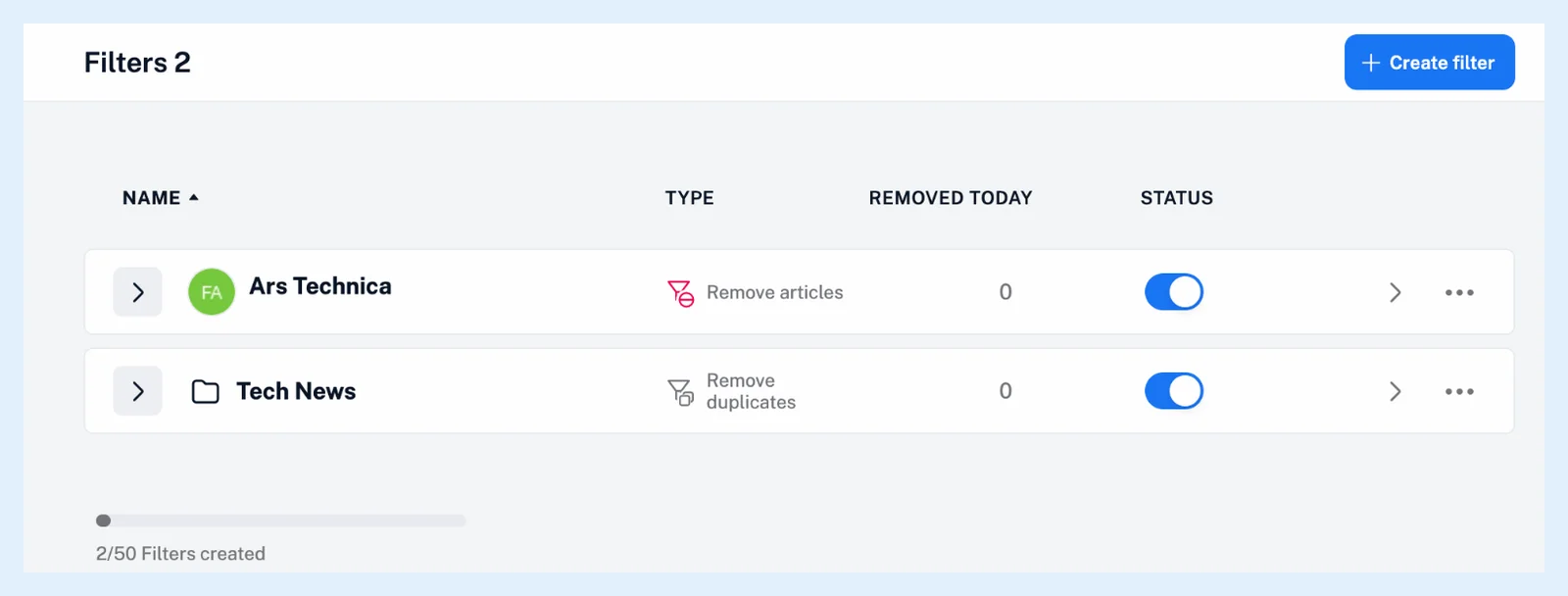
Each row shows the filter's Name, its Type (Remove articles, Keep articles or Remove duplicates), Removed today, which shows "100+" above a hundred and opens the filter log when you click it, and its Status switch. The arrow on a row opens the filtered feed or folder, and the ⋯ menu holds Edit filter and Delete filter. Inoreader asks you to confirm a deletion. The switch turns a filter off without deleting it, and turning it off or deleting it brings the removed articles back as unread. Under the list, a usage bar shows how many of your plan's filters you use.
Set a duplicate filter in the properties
Open Feed properties of a feed and its Automations tab: the switch Remove duplicate articles from this feed sets a duplicate filter up, and Filter feed starts a content filter. Folder properties > Automations has Remove duplicate articles from this folder, and the Newsfeed's Feed properties > Automations has Remove duplicate articles, which is how a duplicate filter covers everything you follow.
Inoreader recommends duplicate filters on the folders and feeds that produce duplicates rather than on your whole account.
Filters are a Pro feature: Pro includes 50, content and duplicate filters together, and a Free account sees an intro page with Upgrade to Pro and, when eligible, Start Pro trial. What are filters? explains the two kinds.
Can't find an answer? Contact support