What can I do with the audio player?
The audio player plays podcast episodes and articles read aloud by text-to-speech from one playlist, and it keeps playing while you move between feeds and articles. Open it with Audio player in the tab bar to skip, change the speed and volume, and reorder or remove the items in the playlist.
Add something to the playlist
Open an article's More menu, the three dots, and choose Add to queue: a podcast episode adds its audio, and any other article adds its text-to-speech version. An episode's own player has an add-to-playlist icon as well. Adding the first item opens the Audio player panel.
Control the playback
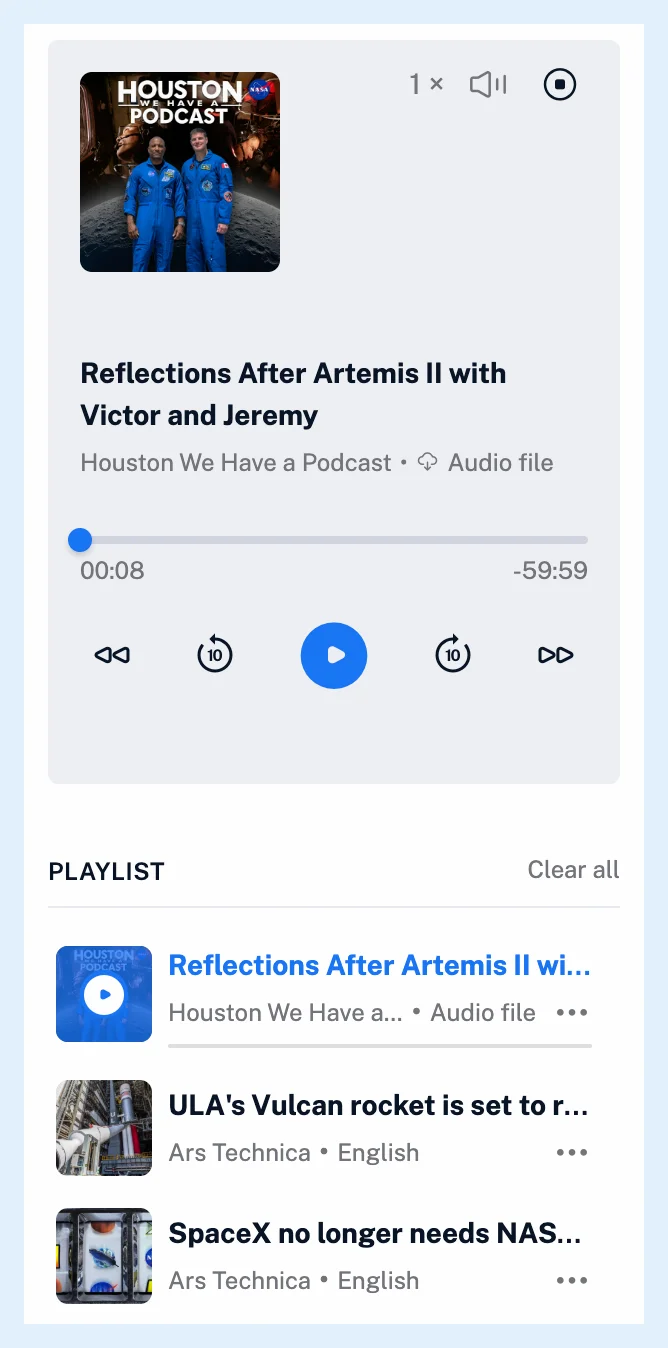
The panel shows the current item's artwork, title and feed, and either its text-to-speech language or an Audio file link to the episode file. The controls are previous and next, 10 seconds back and forward, play and pause, a Speed menu from 0.75 to 2, a volume control and a stop button. Speed and volume are remembered in your browser, and when an item ends, the next one in the playlist starts. Your browser's and your computer's media keys show the item's title, feed and artwork.
The player lives in the tab bar rather than in the article, so playback continues while you open other feeds and articles. Can I listen in the background? has more.
Manage the playlist
Under the player, Playlist lists what's queued. Drag an item by its handle to reorder it, and open its menu for Go to article or Remove from playlist. Clear all empties the playlist after a confirmation. Removing the item that's playing moves on to the next one, and removing the last one closes the player.
The playlist is saved with your account, not only in the browser, and the mobile apps show the same playlist. Episodes and articles read aloud share it, as Can I listen to articles and podcasts together? explains. How do I listen to an article with text-to-speech? and the video cover the article side.
Plans and limits
The player and the playlist work on every plan. Text-to-speech reads 5 articles a day on Free and has no limit on Pro. Can I follow podcasts in Inoreader? explains how to follow a show, and Listen to podcasts in your RSS reader has the overview.
Can't find an answer? Contact support