Can I customize the appearance of Inoreader?
Yes. Pick one of four themes and the interface language, set how dense the sidebar and the article lists are, and change the font, size and line height you read with. With Pro you can also add your own CSS.
Change the theme and language
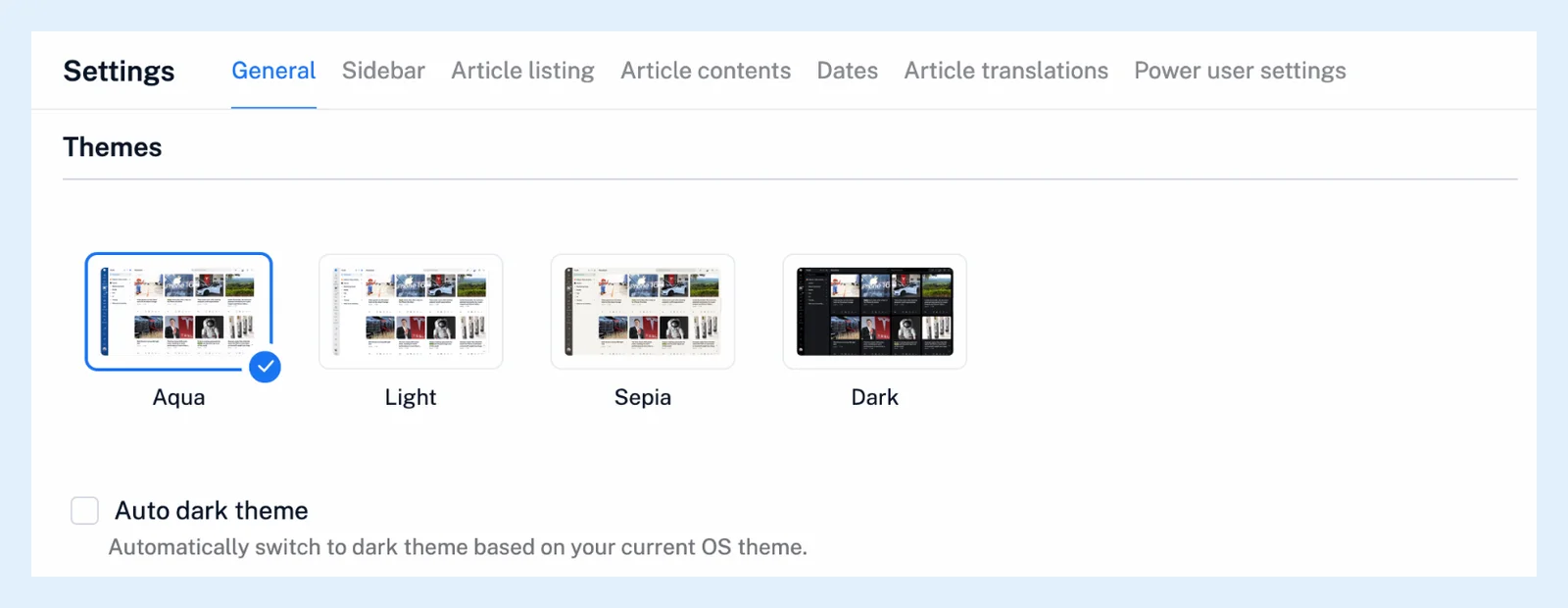
Inoreader has the Aqua (default), Light, Sepia and Dark themes. Your choice is saved to your account and follows you to every browser.
- Click your avatar at the bottom of the tab bar.
- Under Themes, click a theme, or switch on Auto dark theme to follow your system.
The same themes are under Preferences > Settings > General > Themes. Picking Dark by hand pauses the automatic switch, and the blog post Get That Vintage Look With Inoreader's Sepia Theme introduces Sepia.
The interface language is Language on the same General tab. Click Refresh now after changing it.
Adjust the sidebar and lists
The Sidebar tab has Display sidebar in Compact mode, Show favicons (each feed's own icon instead of the RSS icon) and manual or alphabetical Feed sorting and Tag sorting.
On the Article listing tab, pick the default Layout (List, Expanded, Column, Card or Magazine view), the List view density (Comfort, Compact or Ultra), the Column view density and the buttons under More controls. Article contents decides how images and the publisher's Original style are shown, and Dates sets the Date format and Time zone. Can I customize how articles are displayed? covers every list option, What layout options are available? and the video the layouts.
Change the reading text
Open an article, click More and choose Article layout & text to set the Font, Font size, Line height and Layout of the reading pane. Reset to default restores the standard look. Power user settings adds Articles font size, which also affects article titles in List view, and how author, source, controls and attachments are shown.
Add your own CSS
Under Power user settings, tick Custom CSS, write your rules in the box, click Save and refresh your browser. It applies to the web app only (the apps have their own appearance settings). Can I customize the interface with my own CSS? has the details.
If a rule breaks the page, open inoreader.com/?safe_mode=1 to load the site without your CSS.
Plans and limits
Everything above is on every plan except Custom CSS and the Unread counts options above 1000, which are Pro.
Can't find an answer? Contact support