How do I create a monitoring feed?
Go to Add feed > Monitoring feed, add what to watch as keywords or mentions, choose where to look under Monitor in and click Create monitoring feed once the preview has loaded. From a search, the Create monitoring feed button next to the result count turns that search into a feed in one step.
Create a monitoring feed
- Click Add feed in the tab bar and choose Monitoring feed.
- In the box under "What do you want to monitor?", type a word or name and pick the quoted keyword under Add as keyword or a mention under Suggestions.
- Click + OR to add an alternative, + AND for something that must also appear, or - NOT for what to exclude. Use the settings icon on a keyword to limit it to Titles only or Content only.
- Under Monitor in, keep My account with Newsfeed, pick a folder or feed, or switch to All public feeds and pick All sites, Popular sites or Most popular sites.
- Check the Preview on the right, then click Create monitoring feed.
- Enter a Name, tick Add to folder and choose a folder if you like, and click Save feed.
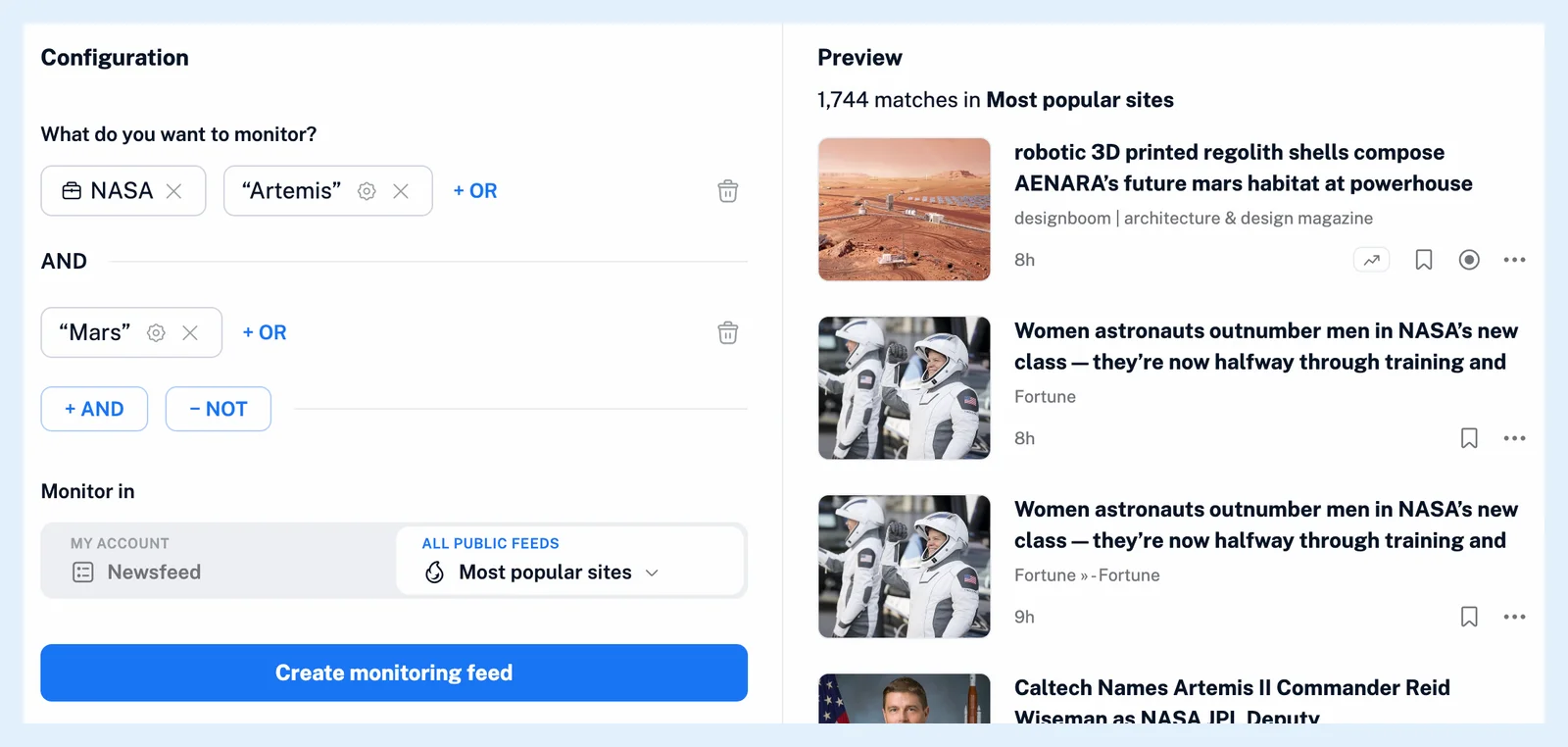
Build the query
As you type, the suggestions show your text in quotes under Add as keyword and, under Suggestions, the mentions that match it with their type (Person, Company, Location, Product or Event) and their articles a week. A keyword is matched as an exact phrase. A mention matches the articles in which Inoreader recognized it. If you prefer operators, Paste an advanced query switches to a text box for a query such as ("electric cars" OR EV) AND Volkswagen NOT bikes. How can I combine search conditions? explains the syntax.
The Preview shows how many articles match in the chosen scope and up to 20 of the newest from the past year. The new feed starts with the previewed articles, up to 100, and appears at the top of your feed list or in the folder you chose.
Create one from a search
Above the results of any search, the line with the result count has a Create monitoring feed button. It asks for a Name, filled in with your search, and offers Add to folder. Configure monitoring feed opens the builder with the search instead. The feed keeps the folder, feed, team folder or public scope of the search and its Language and Match filters. A search over a tag or another scope becomes a feed over your whole Newsfeed.
Plans and limits
Creating a monitoring feed needs Pro, which includes 30. Team plans share their limit across the team, and Free accounts can build and preview a query. A query under three characters or one that would collect more than 100 articles an hour is refused. What are monitoring feeds? explains how the feed fills, Can I edit a monitoring feed later? how to change it, and a rule with the feed as its trigger can alert you to new matches, as What are rules? describes. The feature page Watch any keyword, brand or topic across the web and the blog post Stay in the know with monitoring feeds have more.
Can't find an answer? Contact support