What are the most essential parts of Inoreader’s interface?
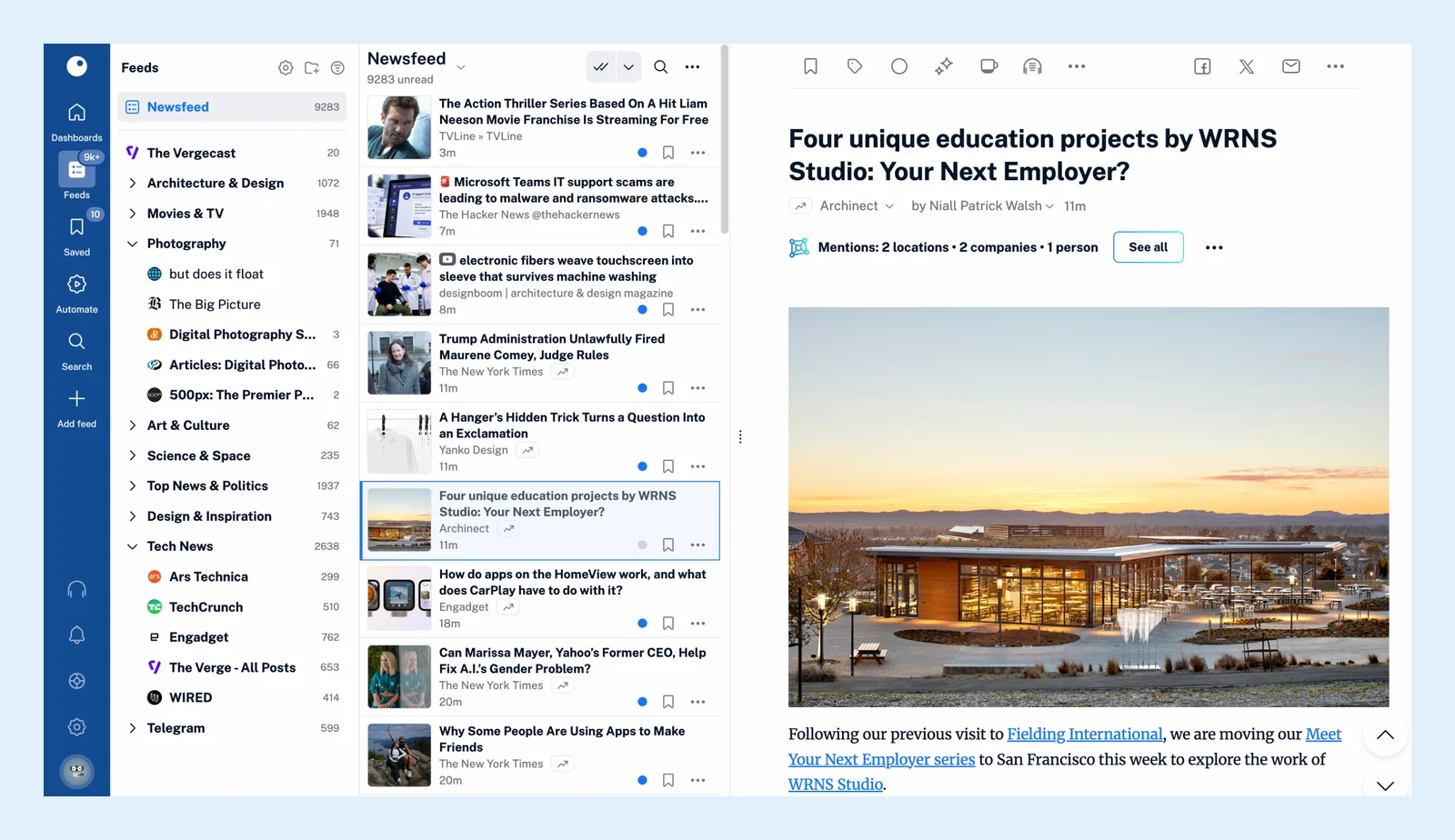
The Inoreader web app has three areas side by side: the tab bar on the left edge, the sidebar next to it and the reading panel, which takes the rest of the window. The tab bar switches between sections, the sidebar lists what each section holds, and the reading panel shows the articles.
The tab bar
The narrow column of icons on the left edge switches between the main sections: Dashboards, Feeds, Saved, Automate, Search and Add feed, with a Team tab between Saved and Automate on Team plans. At the bottom sit the Audio player, Notifications, Support, Preferences and your profile picture, which opens your account panel. The Feeds icon carries your unread count and the Saved icon the number of articles in Read later. Every icon is listed in What can I find in the tab bar?
The sidebar
The column next to the tab bar changes with the tab you picked. Under Feeds it lists Newsfeed, Today and your folders and feeds with their unread counts. Under Saved your Read later list, Archive, Annotations, Web pages, Uploads, Intelligence reports and tags. Under Automate your rules, filters, spotlights and digests. Under Preferences the settings pages. Drag its right edge to make it wider or narrower. Dashboards and Search have no sidebar, so the reading panel gets the whole width there. What is the sidebar used for? lists each tab's items.
The reading panel
Everything you open lands here: the article list of a feed, folder or tag, a dashboard, the search results or a settings page. Its header names the section and holds the controls for it, such as the Unread and All articles switch, Mark all as read, Refresh list, the layout, the sorting and a search box for the current section. In Column view the panel splits in two, with the list on the left and the open article on the right. See What is the reading panel? for its header, layouts and shortcuts.
Keyboard shortcuts and phones
Press D to unpin the sidebar, so it slides out of the way while you read, and D again to pin it back. Press H or ? for the full list of keyboard shortcuts. On a phone the tab bar and the sidebar fold into a menu behind the menu button, and the reading panel takes the whole screen.
Next, see what to do first in Inoreader and how to customize the appearance of Inoreader.
Can't find an answer? Contact support