How do I mark all as read?
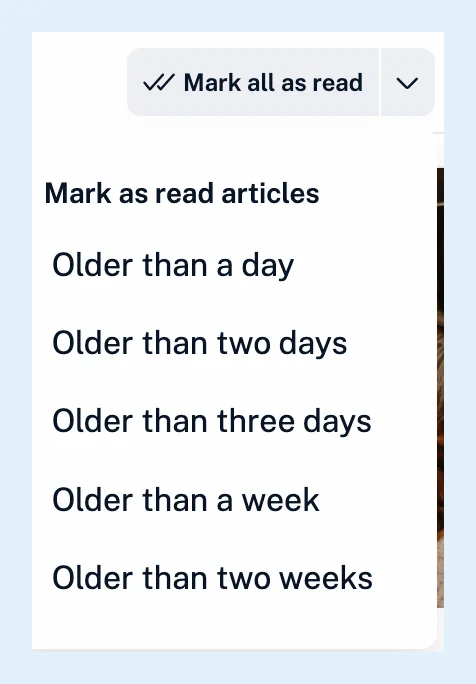
Open the feed, folder, tag or the Newsfeed and click Mark all as read in the header, or press Shift + A. The arrow next to the button marks only articles older than a day, two days, three days, a week or two weeks.
Mark everything in a view
- Open the feed, folder, tag or the Newsfeed.
- Click Mark all as read in the header, or press Shift + A.
- With more than 100 unread articles, click Confirm.
- If you change your mind, click Undo in the "Marked section as read." message right away.
Articles that arrive after you opened the list stay unread. In tags and monitoring feeds, each article is marked read one by one and the message has no Undo.
Mark only older articles
- Click the small arrow next to Mark all as read.
- Choose Older than a day, Older than two days, Older than three days, Older than a week or Older than two weeks.
Articles newer than the period stay unread. On phones the button is the icon alone, with no arrow menu.
Undo and confirmation
Undo shows for six seconds after a mark all in a feed, a folder, All articles or the Newsfeed and puts every feed back where it was. Only the last mark all can be undone, and only once. How can I restore articles accidentally marked as read? covers what to do when the Undo is gone.
Under Preferences > Settings > Article listing > Mark as read behavior you can switch off Mark all as read Undo and Mark as read confirmation, and turn on Advance to next section to open the next unread feed or folder when nothing unread is left.
Ticking Don't ask again in the confirmation dialog switches Mark as read confirmation off as well.
Other ways to mark articles read
With Clickable counters on, the default under Preferences > Settings > Sidebar, clicking a feed's or folder's unread count in the sidebar marks it read. An article's More menu has Mark above as read and Mark below as read. To mark articles read as you scroll past them, see Can articles be marked as read as I scroll?, and every key is in Which keyboard shortcuts does Inoreader have?.
Mark all as read works on every plan. Multiple select, which marks up to 50 selected articles at once, is Pro.
Can't find an answer? Contact support