Which keyboard shortcuts does Inoreader have?
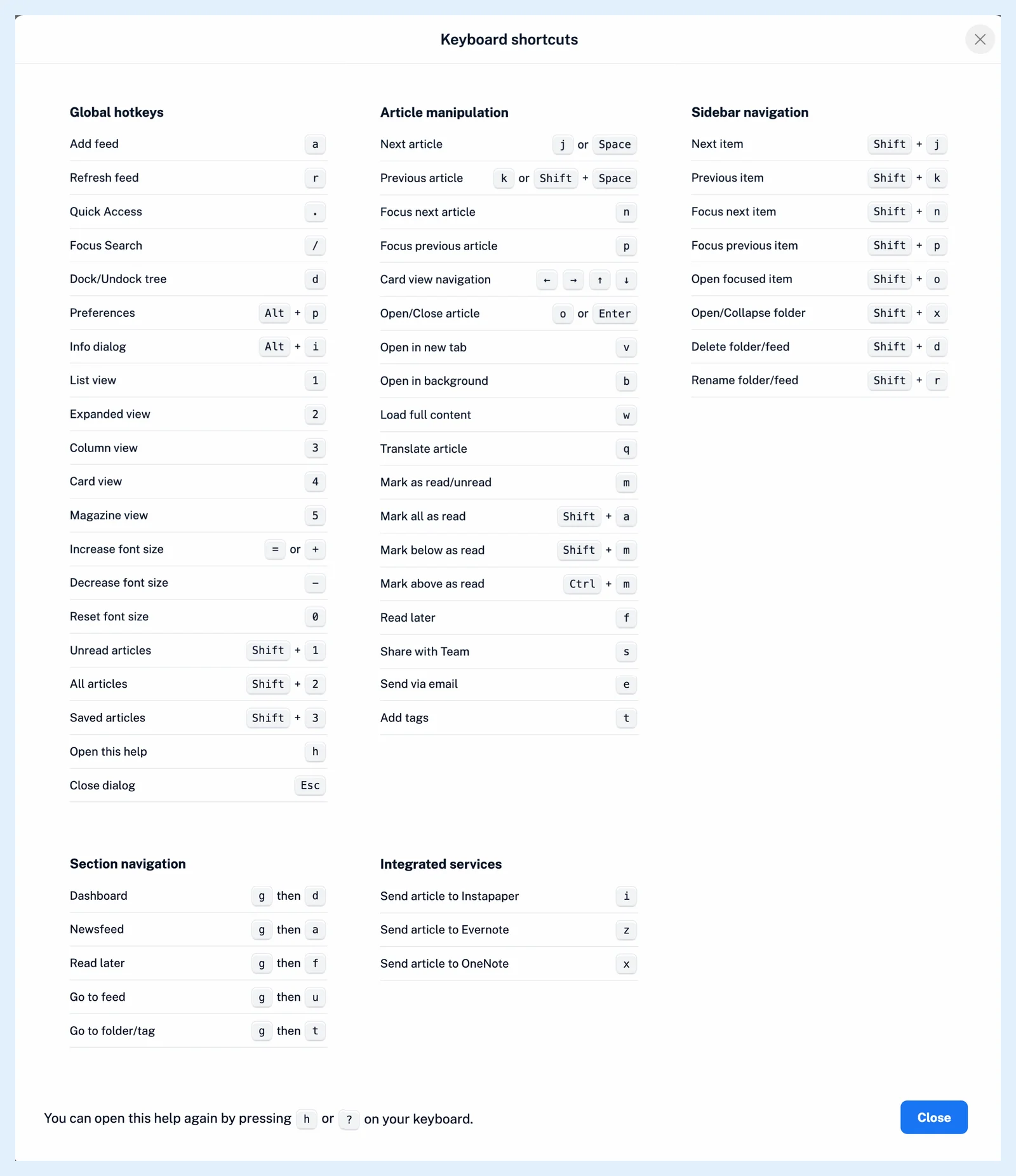
The web app has shortcuts for moving between articles, opening and marking them, switching layouts, moving through the sidebar and jumping to sections. Press h or ? anywhere outside a text field to see them all in the Keyboard shortcuts dialog.
Shortcuts are on by default on every plan, and the actions they start keep their own plan rules. The groups below cover the ones you'll use most.
Move through articles
- j or Space opens the next article and k or Shift + Space the previous one. At the end of the list, Space moves on to the next feed or folder with unread articles.
- n and p move the selection without opening the article.
- o or Enter opens or closes the selected article, v opens its original page in a new tab and b opens it in a background tab.
- w loads the full article when it's offered and q translates it, see how to translate an article.
Mark, send and share
- m marks the selected article as read or unread.
- Shift + a marks the whole list as read, Shift + m every article below the selected one and Ctrl + m every article above it.
- e sends the article by email and t opens its tags, see how to tag an article.
Change the view
- 1 to 5 switch between List, Expanded, Column, Card and Magazine view, see what layout options are available.
- Shift + 1 shows unread articles only and Shift + 2 all articles.
- = or + makes the article text larger, - makes it smaller and 0 resets it.
Move through the sidebar
- Shift + j and Shift + k open the next or previous item, and Shift + n and Shift + p move the highlight without opening it.
- Shift + o opens the highlighted item and Shift + x expands or collapses the highlighted folder.
Jump to a section
- . opens quick access, which lists your feeds, folders, tags, dashboards and sections, see how to jump to a feed, folder or section with quick access.
- g then d opens the dashboard and g then a opens Newsfeed. Press the second key within two seconds.
- a opens Add feed, / opens search and r refreshes the list.
Turn shortcuts on or off
- Click the gear in the tab bar to open Preferences.
- Go to Settings > Power user settings.
- Under Other, switch Keyboard shortcuts off or on.
Shortcuts never fire while you're typing in a text field.
Can't find an answer? Contact support